Authenticated Setup
Public reads and public streams can use public=True without credentials:
from typed_hyperliquid import Hyperliquid

async with Hyperliquid.new(public=True) as client:
  mids = await client.info.all_mids()
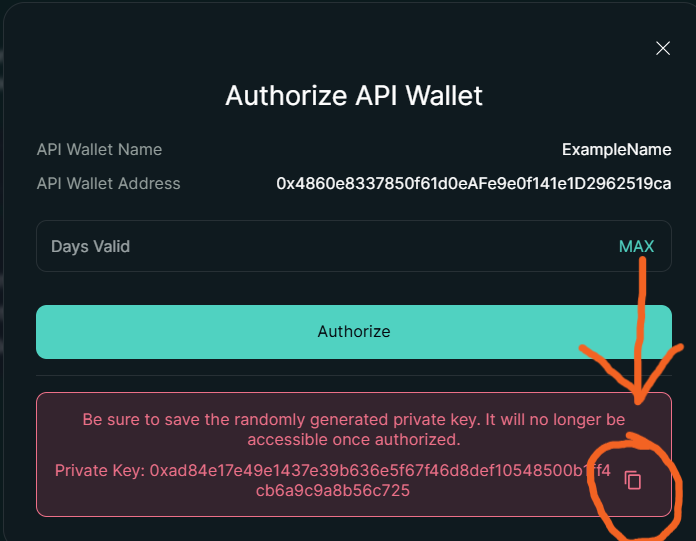
Otherwise, we recommend using "API wallets" instead of your actual private key. You can create them from the Hyperliquid website.
Authorize the API wallet and then copy the private key, as shown in the screenshot below:
Environment Variable
For authenticated exchange actions, set your private key:
export HYPERLIQUID_PRIVATE_KEY="api_wallet_private_key"Then construct Hyperliquid normally:
from typed_hyperliquid import Hyperliquid

async with Hyperliquid.new() as client:
  result = await client.exchange.http.noop()
  print(result['type'])
For testnet, pass mainnet=False and set the testnet key:
export HYPERLIQUID_TESTNET_PRIVATE_KEY="testnet_private_key"from typed_hyperliquid import Hyperliquid
async with Hyperliquid.new(mainnet=False) as client:
result = await client.exchange.http.noop()
print(result['type'])Direct Wallet Usage
You can also pass a private key or wallet object directly:
from typed_hyperliquid import Hyperliquid

async with Hyperliquid.new('0xyour_private_key') as client:
  result = await client.exchange.http.noop()
  print(result['type'])
Security Notes
- Never commit private keys.
- Treat
HYPERLIQUID_PRIVATE_KEYandHYPERLIQUID_TESTNET_PRIVATE_KEYas high-sensitivity secrets. - Treat exchange examples as mainnet-sensitive unless you explicitly set
mainnet=False.